
Traditionally the first program that any programmer writes in their new language is “Hello World”. So let's start there and make it a bit more fun as well.
Open up your python editor (see "Getting Started") and write, save and run the following short program:
print(“Hello World”)
Don’t forget that speech marks come in pairs and brackets come in pairs, one opening and one closing.
print() is the way that python uses to say things; to write them to the screen. Don't forget that when you run a python program it is the programming saying something, not you, the programmer. You have created the program to do the talking for you. The print command always has opening and closing brackets after it, even if it is not going to say anything.
Now that you understand how to make your program say something, let’s get it to ask a question. Don’t forget that when the program is asking the question, it is not you, the programmer asking, it is the program that you have created that will do the asking. Python uses the input() command to ask a question. When your program asks a question, it expects an answer. When the person answering the question types into the computer, their answer needs to be remembered by the program. To do this, the program needs to have a “bucket” to put the answer into so that it can be referred back to later on. This “bucket” is called a variable and can be named anything that the programmer (that’s you) wants to call it. It is best to have variables that have names that tell remind the programmer what type of answer they contain. Let’s write a program that asked the user their name (that could be anyone else or it could be you if you are trying out your program. If that is the case you need to play the role of the user as well as the programmer at different times; the programmer when creating the program and the user when running the program). Once the program has asked the user their name, it will print out a friendly greeting:

In this short, two-line program there is a lot happening. Let’s talk through it. The first thing that happens is that there is a variable “name” create. This is assigned to anything that the user will answer when asked the question “What is your name?”. The input() command is used to ask the question. The print() command then says “Hello” followed by the information that is stored inside the variable name. Notice that the word “Hello” is in speech marks, followed by a comma and then the variable name is not in speech marks. This tells the program to say the value held inside the variable name, not the word “name”. When using IDLE you will see that everything inside speech marks (between the two sets) is colours green, the commands input and print are both coloured purple and everything else is coloured black. These are the default colours for text, commands and variables (if you want to, you can change these colours in the options-> configure IDLE ->Highlights tab).
Make a change to your program so that it also says that name is the greatest programmer in the world! Can you make your program say this five times? Your output should now look like this:
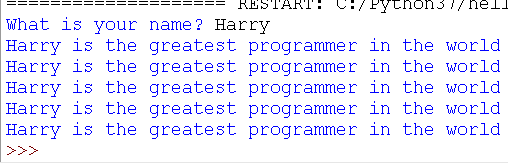
That’s a bit null. Let's see if we can make our printout look like this:
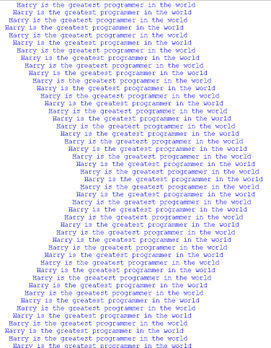
If we want the program to do the same thing again, to repeat something that it needs to do more than once we can make a loop. There are two types of loops, one that loops for the number of times that we need it to (called a count controlled loop of for loop) and one that will loop while a condition is true (called a condition controlled or while loop). Other programming languages have other types of loops but these are the two types in Python 3, the language we are learning today. Let’s print out our sentence name, “is the greatest programmer in the world”, 100 times. For this, we know how many times we want to loop - one hundred - so we will use a for loop.

This looks complicated but it is not, let’s walk through the program:
Firstly the program asks the user to enter their name. You have done this before, the input command is used to ask the question and the answer goes into the “bucket” - variable - called name. On the next line, we start the “for” loop. This has a variable called count that will hold the value 0 to 100, changing each time the piece of code repeats. The next part of the line uses a special function in python called range(). This gives a different number each time it is called. The line ends with a colon - :. The next line is the line that we want to repeat, this is indented, that is moved over to the right. This tells the program that this is the piece of code that must be repeated. If there were more lines that needed to be repeated, they would all be indented by the same amount.Try making a change to print out the value held in the variable count to see this change each time the print line is repeated. Notice that the count runs from 0 to 99 not from 1 to 100. It loops 100 times but the first time is 0 and the last time is 99.
This is great but it is still dull, it just goes straight down the screen. Let’s make the words go sideways as well. We can add a space to the front of the sentence so that it looks like it has moved over when it is printed out. If we use the count variable, which we know changes each time we repeat, we can make the number of spaces that we add grow every time we repeat the loop.
In this change, we have created a variable called space and set this equal to a space (notice this is not nothing. There is a space between the speech marks). As we go around the loop, we can add the number of spaces that are equal to the number of times we have already gone around the loop (if you added the count variable to the print-out, you can see how many spaces this is each time)

Instead of multiplying by the value in the count variable, we can use addition to add an extra space for every time around the loop. With this change, we created a new variable to hold the number of spaces that we wanted and then move the multiplication into the print statement.
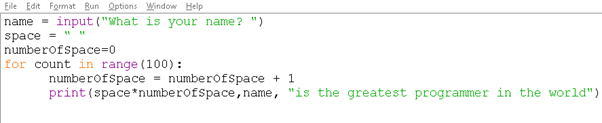
Notice that the output from this program starts to get a bit messy as the number of spaces adds up to a large number and looks like extra lines between the text. We want to stop this. We can do that using an “if” statement. Try this:
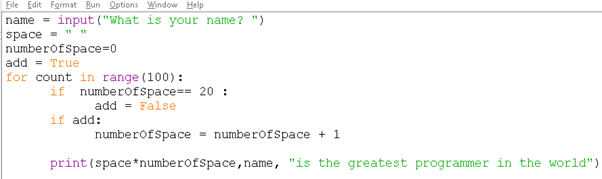
We have added another new variable add. This is a type of variable that will only hold True or False. You can change that in a moment. Notice that the “if” statement checks if the numberOfStpaces equals twenty with TWO equal signs. The “if” statement also has a colon at the end of the line in the same way that for loop does. Now your output should look like this:
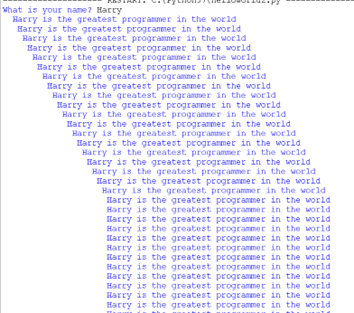
Now we want to make the sentence move backwards. In order to do that you will need to use subtraction. If you subtract, you also need to check that the number of spaces doesn’t go below zero. When numberOfSpaces gets to zero, you need to add spaces again. To flip the direction we need to either add or subtract spaces. We can do this by multipliing 1 by either +1 or -1 (-1 will be the same as subtracting) when calculating the number of spaces to use. We can flip between +1 and -1 when the count equals 20 or zero. So let’s write full the requirements for the program now
| Step | Functionality |
|---|---|
| 1 | Ask the user to input their name |
| 2 | Initialise the variables to their starting values (space = “ “, numberOfSpaces = 0) |
| 3 | Loop around 100 times |
| 4 | If numberOfSpaces == 20, change the multipler to -1 |
| 5 | If numberOfSpaces == 0 , change the multipler to +1 |
| 6 | numberOfSpaces = numberOfSpaces + (1*muliplier) |
| 7 | Print(space* numberOfSpaces, name, “is the greatest) |
Now make a change to replace the “for” loop with a while loop. If you change this to “while True:” it will run forever zigzagging backwards and forwards across the screen. Now you can also change the 20 to something larger to make the zigzags bigger.