
Noughts and crosses (or tic-tac-toe if you are American) is a game that was played in ancient Egypt and by the Romans. It is also one of the very first computer games ever written in 1952. That game was a human against the computer and the computer always played the perfect game (it never lost!). This version of the game is played between two people. If you want to change this into an unbeatable AI computer game, the algorithm is in part 5.
There are lots of different ways of writing this game. We will use guizero buttons and put an X or O on the button that has been pressed.
Guizero lets us arrange things on the screen in a grid pattern. In computing, lots of different things start counting at zero and the grid for guizero is the same. Each thing we put on the screen has X and Y coordinates starting from zero:
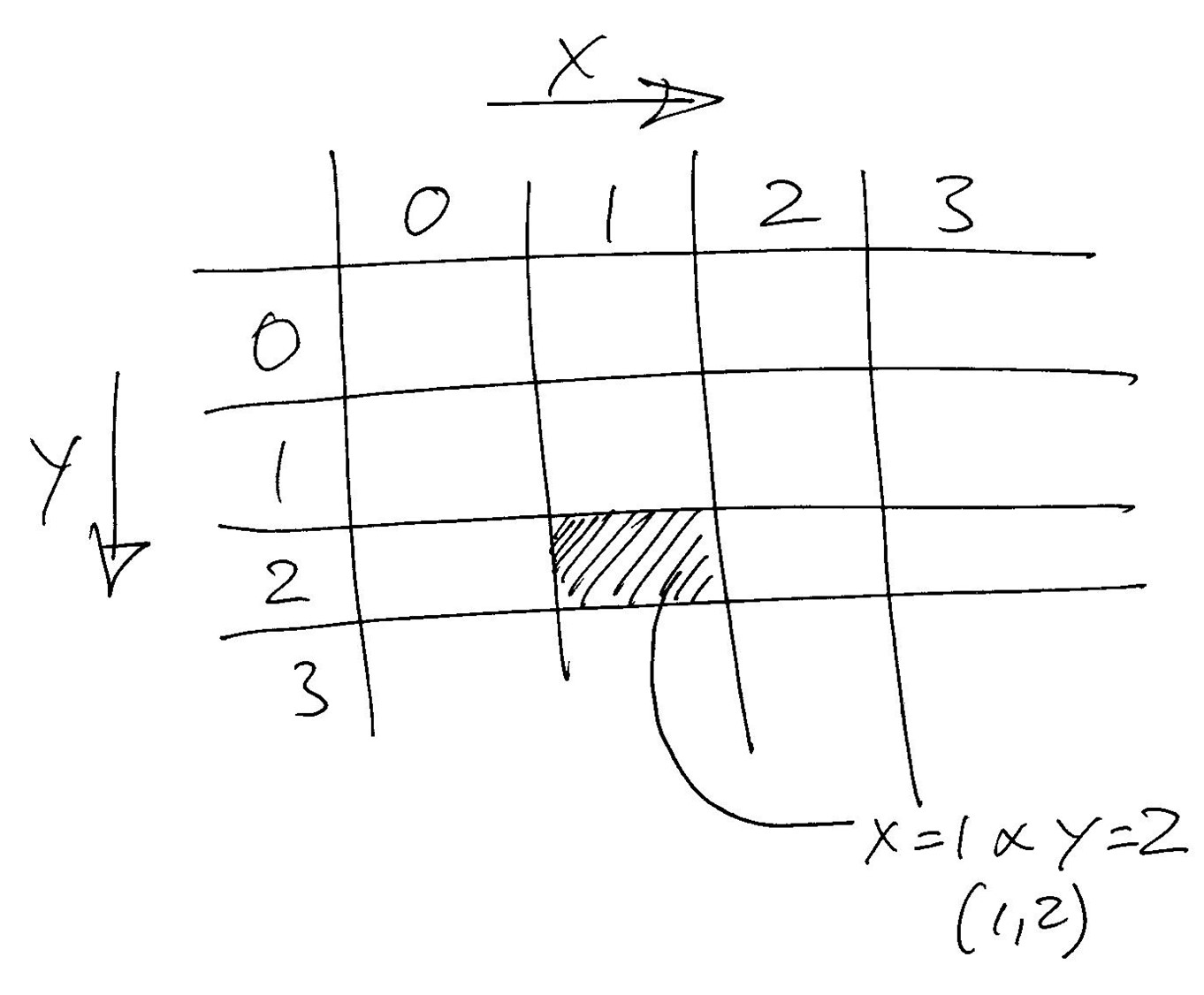
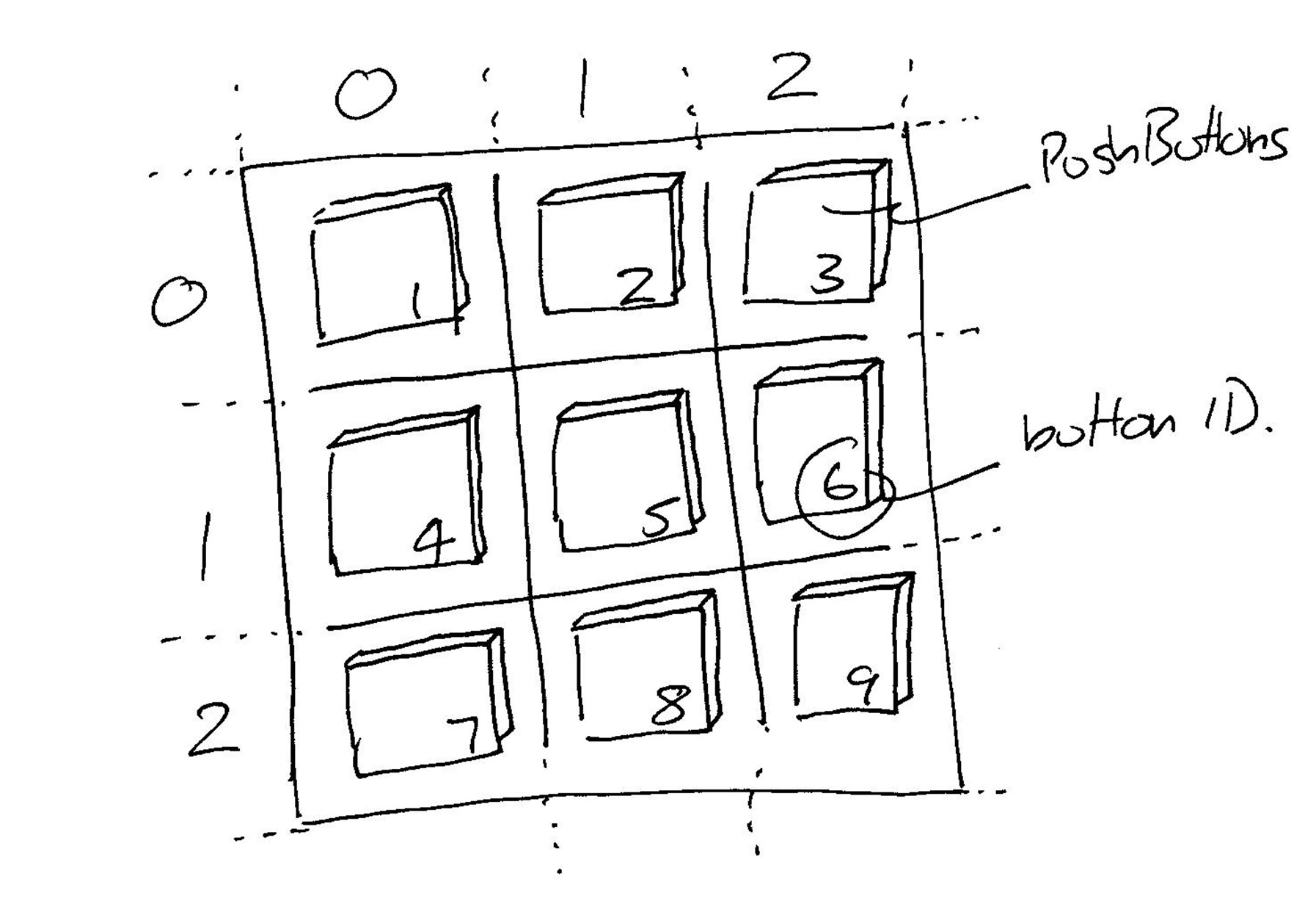
Lay out a grid of 9 buttons each with a unique number. This will allow us to identify which button has been pushed. Flip between X and O for each move. When there are three of the same symbol in a row, declare a winner and stop the game.
| Step | Functionality |
|---|---|
| 1 | Create the screen |
| 2 | Add 9 buttons |
| 3 | Flip between X and O each time a turn is taken |
| 4 | Work out who has won and then stop the game |
Import the guizero library and create the screen. We will also create two variables that we will use later.
from guizero import *

#-----------procedures and functions----------

#--------main---------------

currentSymbol= "X"
gameOver = False

app = App("Naughts and Crosses", height=270, width=200,layout="grid")

app.display()
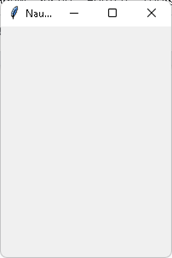
Now test your program. Your output should look like this.
Each button needs its own unique ID, a number from 1 to 9. When writing the “select” procedure, put a temporary print statement in it so that you can test that each button has the correct ID (see design above). The ID of the button is given to the procedure using the args list in the definition of each button. Make sure that this ID matches the button that it represents.
from guizero import *

#-----------procedures and functions----------

def select(buttonID):
    print(buttonID)
    pass

#--------main---------------

currentSymbol= "X"
gameOver = False

app = App("Naughts and Crosses", height=270, width=200,layout="grid")

#   1|2|3
#   -----
#   4|5|6
#   -----
#   7|8|9

button1 = PushButton(app,height=3,width=5,grid=[0,0],text="",\
                     command=select,args = [1])
button2 = PushButton(app,height=3,width=5,grid=[1,0],text="",\
                     command=select,args = [2])
#complete for the other 7 buttons

app.display()
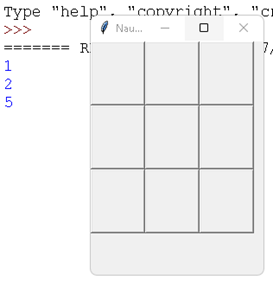
Now test your program. Your output should look like this. Make sure that, when the buttons are pressed, the correct number is printed out.
Each player needs to have either the O or the X. These need to alternate between players and flip for each turn. If the last move was X, the next will be O. If the last move was O, the next will be X and so on. Our game should do this for us.
from guizero import *

#-----------procedures and functions----------

def flip(lastUsed):
    if lastUsed == "X":
        useNext = "O"
    else:
        useNext = "X"

    return useNext


def select(buttonID):
    global currentSymbol
    global gameOver

    if not gameOver:
        currentSymbol = flip(currentSymbol)

        if buttonID == 1:
            button1.text = currentSymbol
        elif buttonID == 2:
            button2.text = currentSymbol
        #complete for the other 7 buttons

#--------main---------------
#main is unchanged
Now test your program. Your output should look like this. Make sure that the symbol changes each time you press the button. Test every button.
You could make this better in two ways; you could add an image of an X or an O instead of using the text (see zoom, boing, bounce or rock paper scissors) in an “if” statement. You could also make a change to the button to set enabled = False when it has been pressed. This would prevent players from pressing a button that had already been pressed. Look at the online documentation for guizero. This will show you how to do this. .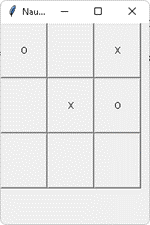
Once we have symbols in each button we need to look at the symbols and decide if there are three the same in either a row, a column or each of the two diagonals. We do this check at the end of the select procedure.
from guizero import *
#-----------procedures and functions----------
def checkWinner():
    global gameOver
    #horizontal
    if button1.text != "" and button2.text != "" and button3.text !="":
        if button1.text == button2.text and button2.text == button3.text:
            info.value = button1.text+" is the winner"
            gameOver = True
    if button4.text != "" and button5.text != "" and button6.text != "":
        if button4.text == button5.text and button5.text == button6.text:
            info.value =button4.text+" is the winner"
            gameOver = True
    if button7.text != "" and button8.text != "" and button9.text != "":
        if button7.text == button8.text and button8.text == button9.text:
            info.value =button7.text+" is the winner"
            gameOver = True

    #vertical
    if button1.text != "" and button4.text != "" and button7.text != "":
        if button1.text == button4.text and button4.text == button7.text:
            info.value =button1.text+" is the winner"
            gameOver = True
    if button2.text != "" and button5.text != "" and button8.text != "":
        if button2.text == button5.text and button5.text == button8.text:
            info.value =button2.text+" is the winner"
            gameOver = True
    if button3.text != "" and button6.text != "" and button9.text != "":
        if button3.text == button6.text and button6.text == button9.text:
            info.value =button3.text+" is the winner"
            gameOver = True

    #diagonals
    if button1.text != "" and button5.text != "" and button9.text != "":
        if button1.text == button5.text and button5.text == button9.text:
            info.value =button1.text+" is the winner"
            gameOver = True

    if button3.text != "" and button5.text != "" and button7.text != "":
        if button3.text == button5.text and button5.text == button7.text:
            info.value =button3.text+" is the winner"
            gameOver = True

def flip(lastUsed):
    #unchanged

    return useNext,lastUsed

def select(buttonID):
    global currentSymbol
    global gameOver

    if not gameOver:
        currentSymbol = flip(currentSymbol)

        if buttonID == 1:
            button1.text = currentSymbol
        elif buttonID == 2:
            button2.text = currentSymbol
        #complete for the other 7 buttons
        checkWinner()

#--------main---------------
#main is unchanged except….

Info = text(app,grid=[0,3,3,1],text=””,height = 1, width = 20)
app.display()
Now test your program. Your output should look like this. Make sure that the symbol changes each time you press the button. Test every button. Test every possible way to win.
Rather than have a game between you and a friend, write a new procedure that creates the computer’s move.
The computer goes first and puts an X in a corner, it doesn’t matter which corner so this could be a random selection between 4. This will be a procedure call from the main part of the program. All other calls to the computer move procedure will need to be from the “select” procedure. For all of the next moves, use these steps:
Sometimes code needs to be written in a way that is easy to understand. At other times, efficiency is more important than simplicity. We have already seen that there is a way to make the “flip” of the X and O more efficient. There is another way to make the whole game more efficient by changing the arguments in the buttons. The reason that the program is written like it is above is to show you that you can pass parameters (arguments) to the procedure defined as the command on the button. Writing it this way gives a very clear algorithm that is easy to follow. There are, however, more efficient ways to write the same thing. In this example we change the way that the procedures are called when the button is pressed. Instead of assigning to a command, we can assign the procedure to an event. Therefore when a specific event happens we can call the procedure and the details of the event which gets passed to the procedure, contains the actual widget that trigger the event and all of the widgets properties. This sounds com[licated so the best thing to do is to try it out. The “select” procedure now is very simple:
def select(event):
    global currentSymbol
    global gameOver

    if not gameOver:
        currentSymbol = flip(currentSymbol )
        button  = event.widget
        button.text = currentSymbol
        checkWinner()

The definition of each button is now changed as well:

#-----main—--
button1 = PushButton(app,height=3,width=5,grid=[0,0],text="")
button1.when_clicked = select

button2 = PushButton(app,height=3,width=5,grid=[1,0],text="")
button2.when_clicked = select

#complete the same for the remaining buttons
Everything else stays the same.
Don’t worry if this is confusing. We’ll come back to events when we look at game loops in the next chapter. For now, give it a go and see if you can get it working…